Integrations
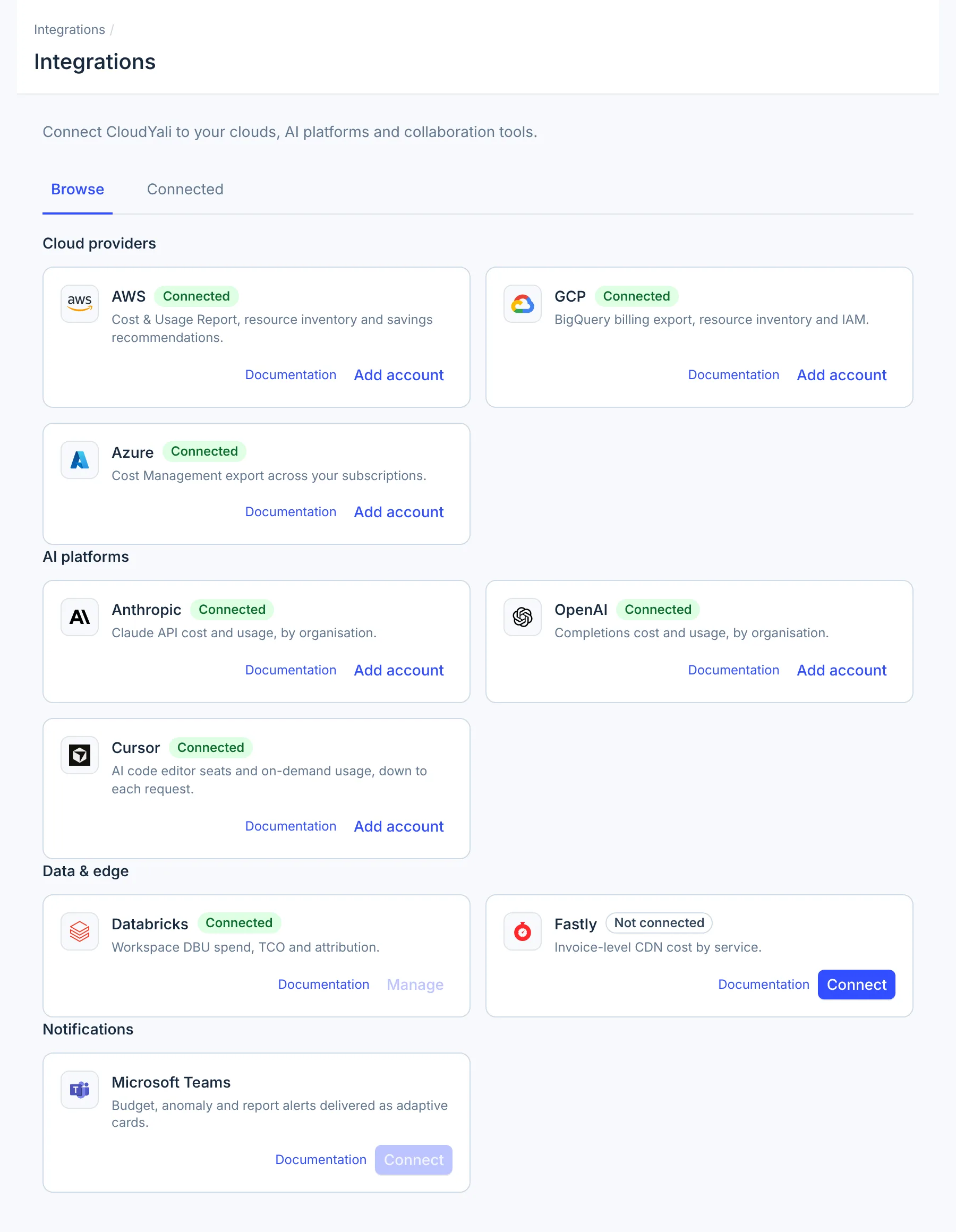
Integrations is the CloudYali page where you connect your clouds and AI tools, then check and manage each connection. Open it from Integrations at the bottom of the console's left navigation.
What you can do
- Connect AWS, Microsoft Azure, Google Cloud, Anthropic, OpenAI, Cursor or Fastly from its card.
- Add more accounts of a provider you already use with Add account.
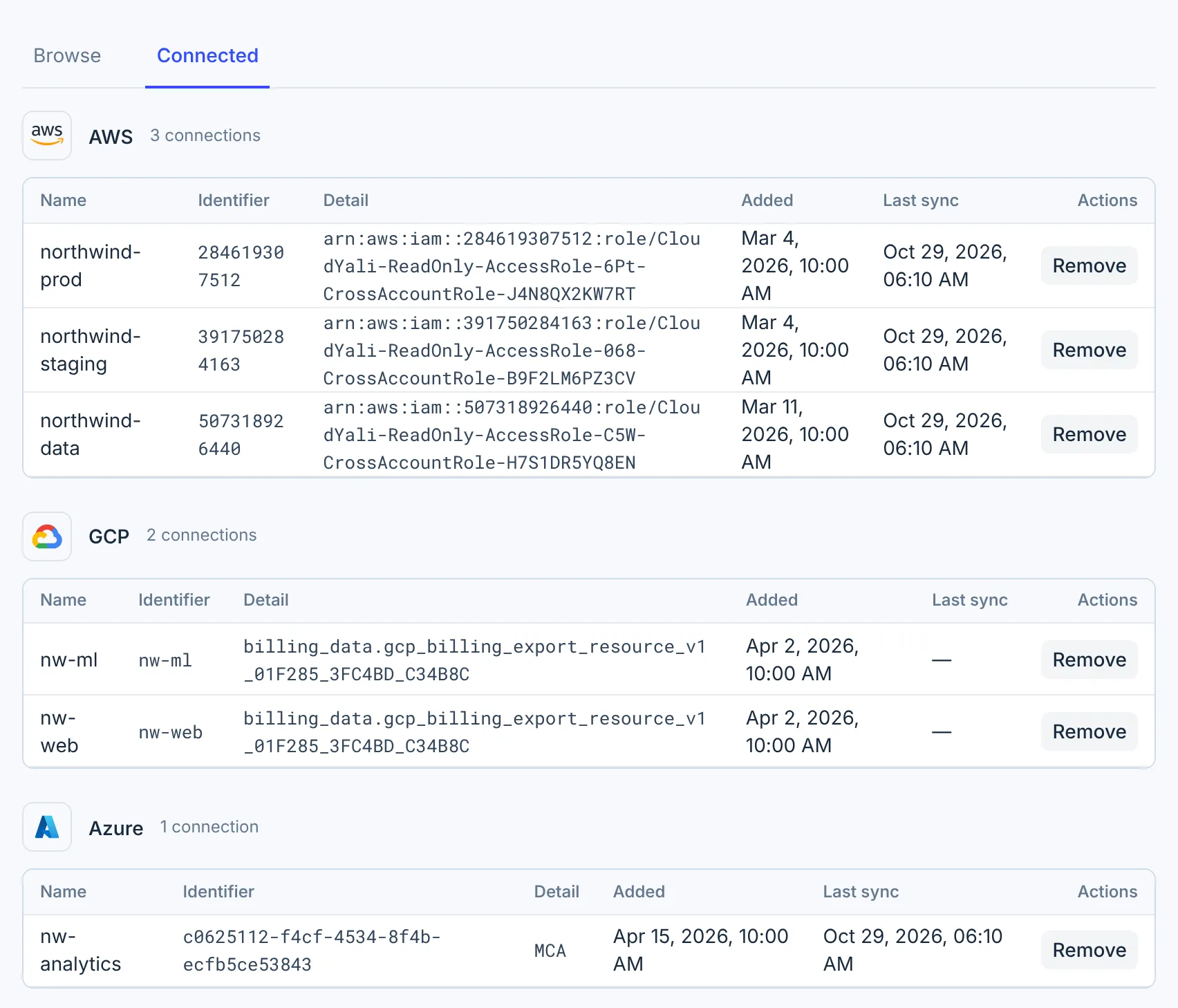
- See every connection, when you added it and when it last synced, on the Connected tab.
- Replace a Cursor key without losing the team's cost history.
- Remove a connection you no longer need.
Why it matters
Connecting a cost tool usually starts with a security review. Each connect page lists what CloudYali reads and why, and AWS connects through a CloudFormation stack you can review before you create it. After that, every connection sits on one tab with the date it last synced, so a key that stopped working shows up as an old date on the Connected tab.
How it works
The Browse tab lists every provider CloudYali supports, in four groups: Cloud providers, AI platforms, Data & edge and Notifications. Each card shows Connected or Not connected, a Documentation link, and a button: Connect, or Add account once you have one connection.
| Provider | How CloudYali connects | Guide |
|---|---|---|
| AWS | A CloudFormation stack creates an IAM role that CloudYali assumes | Connect AWS |
| Azure | A service principal that reads a Cost Management export from your storage account | Connect Azure |
| Google Cloud | A service account key you create, and your BigQuery billing export | Connect Google Cloud |
| Anthropic | An Admin API key | Connect Anthropic |
| OpenAI | An admin key | Connect OpenAI |
| Cursor | A team Admin API key with the admin:* scope | Connect Cursor |
| Fastly | An API token | Connect Fastly |
The Databricks and Microsoft Teams cards are listed, but their buttons are turned off: you cannot connect either from this page yet.
When data appears
CloudYali collects data on a schedule. Nothing syncs at the moment you connect, so the first data arrives with the next scheduled run.
| Provider | First sync covers | Then |
|---|---|---|
| AWS | Resources from the first inventory scan, which starts when the role is confirmed; cost within 24 hours of AWS's next Cost & Usage Report delivery | Once a day |
| Azure | Up to 6 months of the export files in your storage account | Once a day |
| Google Cloud | About two months of cost, starting on the first day of a month | Once a day |
| Anthropic, OpenAI | 6 months of usage and cost | Once a day |
| Cursor | 30 days of requests and 180 days of daily usage | Every 6 hours |
| Fastly | Every invoice Fastly makes available | Once a day |
See your connections
The Connected tab lists each provider you have connected, with one row per connection.
| Column | What it shows |
|---|---|
| Name | The name you gave the connection |
| Identifier | AWS account ID, Google Cloud project ID, Azure subscription ID, the AI provider's organization name, or the Fastly account ID |
| Detail | The IAM role CloudYali assumes (AWS), the billing export table (Google Cloud), the agreement type (Azure), or part of the key: the first 20 and last 4 characters for Anthropic, the first 10 and last 4 for OpenAI. Fastly shows — |
| Added | When the connection was created |
| Last sync | When CloudYali last collected data from it. Google Cloud rows show —: the console does not show their last sync yet. For AWS the column does not reflect cost collection, and for Azure it can be the resource sync; see Data freshness |
Replace a Cursor key
To keep a Cursor team's history when its key expires or is rotated, replace the key instead of removing the team. You need the admin role in CloudYali.
- Open Integrations, then the Connected tab.
- In the Cursor row, select Replace key.
- Paste the new team Admin API key.
- Select Save.
CloudYali checks the key with Cursor before saving it. The team's history is kept, and a disabled team is turned back on.
Remove a connection
- Open Integrations, then the Connected tab.
- In the row you want to remove, select Remove.
- Check the name and identifier, then select Remove to confirm.
CloudYali stops collecting data from that connection. What else happens depends on the provider:
| Provider | Cost history already collected | Credentials | To revoke access completely |
|---|---|---|---|
| AWS | Kept | The IAM role stays in your account | Delete the CloudYali stack in CloudFormation; see Connect AWS |
| Azure | Kept | CloudYali keeps the stored client secret | Delete the client secret in Microsoft Entra ID |
| Google Cloud | Kept | CloudYali keeps the stored key | Delete the service account key in Google Cloud |
| Anthropic, OpenAI, Fastly | Kept | CloudYali deletes the stored key or token | Revoke the key in the provider's console |
| Cursor | Deleted | CloudYali deletes the stored key | Revoke the key in the Cursor dashboard |
Removing a Cursor team deletes its cost history in CloudYali. To fix an expired key, use Replace key instead.
Supported providers
| Provider | Supported | Notes |
|---|---|---|
| AWS | Yes | A CloudFormation stack, for one account or an AWS Organization |
| Microsoft Azure | Yes | A service principal and a Cost Management export |
| Google Cloud | Yes | A service account key and the BigQuery billing export |
| Anthropic | Yes | Admin API key |
| OpenAI | Yes | Admin API key |
| Cursor | Yes | Team Admin API key; only CloudYali admins can connect, and Replace key keeps the history |
| Databricks | No | |
| Fastly | Yes | API token |
| Microsoft Teams | No |
Limits
- Databricks and Microsoft Teams cannot be connected from the console yet. To connect either, contact support@cloudyali.io.
- Only Cursor has Replace key. To change the credentials of another connection, contact support@cloudyali.io.
- A connection cannot be paused, only removed.
- There is no button to start a sync; each provider syncs on its schedule.
- Remove works on one row at a time.
FAQ
Is CloudYali access read-only?
CloudYali calls only read operations. AWS, Azure and Google Cloud connect with read-only access; AWS permissions lists every action. Anthropic, OpenAI and Cursor issue only admin keys, which can do more than read, but CloudYali calls only their read endpoints. Each provider's page lists what CloudYali reads.
How long until I see data after connecting?
Data arrives with the next scheduled sync, which runs once a day for most providers and every 6 hours for Cursor. AWS cost data arrives within 24 hours of the next Cost & Usage Report delivery.
Does removing a connection delete my data?
Only for Cursor, whose cost history is deleted. For every other provider, the cost history already collected stays in CloudYali.
Can I connect more than one account of the same provider?
Yes. Once a provider is connected, its card shows Add account, which opens the same connect flow for the next account.
Who can connect or remove a Cursor team?
Only a CloudYali user with the admin role can connect, replace the key of or remove a Cursor team.