Cost Savings
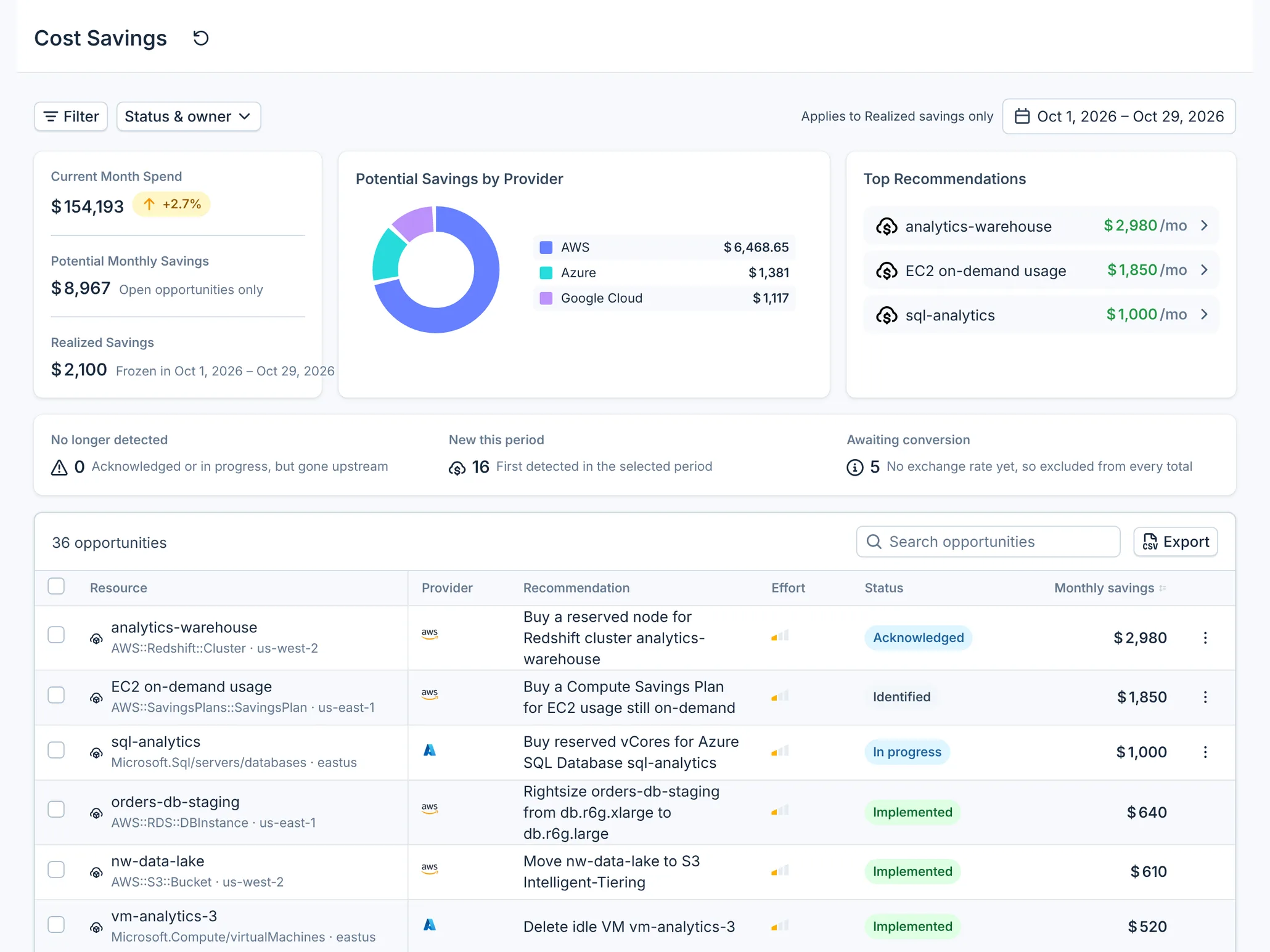
Cost Savings lists the savings opportunities found in your AWS, Microsoft Azure and Google Cloud accounts, largest monthly saving first, and tracks each one until it is implemented. Open it under Cost Management → Cost Savings.
What you can do
- See Potential Monthly Savings across clouds, by provider, with your biggest opportunities first.
- Move an opportunity through Acknowledged and In progress to Implemented, with a reason and comments.
- Record Realized Savings for the month when you implement an opportunity.
- Filter by provider, account, region, category, risk, effort, status and assignee, and export the list as CSV.
Why it matters
AWS, Azure and Google Cloud each list savings tips, but none of them records who acted on a tip or what it saved. In Cost Savings each opportunity has a status, a timeline of who changed it and why, and, once implemented, a fixed record of its monthly savings.
How it works
Once a day, CloudYali collects opportunities from six sources and updates the ones already in the list:
| Provider | From the provider | From CloudYali's own rules |
|---|---|---|
| AWS | AWS Cost Optimization Hub | On your resources and Cost & Usage Report; see AWS savings checks |
| Azure | Azure Advisor, cost recommendations | See Azure savings checks |
| Google Cloud | Google Recommender, from your BigQuery export | See Google Cloud savings checks |
Amounts are in USD and per month, except Google Recommender's, which are Google's projected cost change. An opportunity that has no USD amount, because its source reports none or reports another currency, still appears in the list as Unconverted and counts under Awaiting conversion, but not in any total.
AI tools, Databricks and Fastly do not add opportunities to Cost Savings today; see AI and SaaS savings.
Read the page
| Element | What it shows |
|---|---|
| Current Month Spend | Spend across all providers this month so far, against the previous period |
| Potential Monthly Savings | What the open opportunities with a USD amount would save each month |
| Realized Savings | Savings recorded in the period picked at the top right, this month by default |
| Potential Savings by Provider | Potential savings split by AWS, Azure and Google Cloud |
| Top Recommendations | The three opportunities worth the most |
| No longer detected | Opportunities you are working on that their source no longer reports |
| New this period | Opportunities first detected in the picked period, and how many came back |
| Awaiting conversion | Open opportunities with no USD amount |
The table lists every opportunity except ignored ones, sorted by Monthly savings. Select a resource to open its details: what was found, how the amount was calculated, a remediation runbook, and the Activity timeline.
Work an opportunity
- Open Cost Management → Cost Savings.
- Select the resource name to read the details and the runbook.
- In the row's actions menu, select Acknowledge to show the team you have seen it.
- Select Start work when someone takes it on.
- After the change is made, select Mark as implemented.
- Add a Reason if you want, and select Confirm.
Marking an opportunity implemented records its monthly amount as Realized Savings. See Lifecycle and realized savings for every status and move.
Filter and export
Select Filter to add a group for one provider, then narrow it by account, region, category, risk or effort. Groups are combined with OR, so two groups show both. Status & owner filters by status, assignee and whether the source still detects the opportunity. Search matches the recommendation, resource name and resource ID.
Export downloads the filtered list as CSV. It works with one provider group and no exclusions. A list over 10,000 rows cannot be exported: add filters until it is smaller.
Supported providers
| Provider | Supported | Notes |
|---|---|---|
| AWS | Yes | Cost Optimization Hub and CloudYali's own rules |
| Microsoft Azure | Yes | Azure Advisor (no amounts) and CloudYali's own rules |
| Google Cloud | Yes | Google Recommender export and CloudYali's own rules |
| Anthropic | No | |
| OpenAI | No | |
| Cursor | No | |
| Databricks | No | |
| Fastly | No |
Limits
- Only Cost Optimization Hub, Google Recommender, Azure Advisor and CloudYali's rules feed Cost Savings. AWS Compute Optimizer's rightsizing arrives through Cost Optimization Hub; Trusted Advisor checks do not reach Cost Savings.
- CloudYali does not read Azure Advisor's savings amount yet, so Advisor opportunities are Unconverted, and an opportunity with no amount cannot be marked implemented.
- Amounts in a currency other than USD stay Unconverted.
- The console cannot assign an opportunity to a person yet; the Assignee filter shows assignments made through the API.
- Filters are not kept in the page address, so a filtered view cannot be shared as a link.
FAQ
Is Realized Savings measured from my bill?
No. When you mark an opportunity implemented, CloudYali records its estimated monthly amount at that moment. It does not compare bills before and after the change.
Why does an opportunity show Unconverted?
It has no USD amount: Azure Advisor reports none, some CloudYali deletion checks write none today, and amounts in other currencies are not converted yet.
How often does the list update?
Once a night. Opportunities a source no longer reports become No longer detected after the next sync.
Who can change an opportunity's status?
Any user in your organization, whatever their role. Every change is recorded on the Activity timeline with the person and the reason.
Does Cost Savings include AI tools?
Not today. Amazon Bedrock appears through one AWS check, idle provisioned throughput. Anthropic, OpenAI, Cursor and Databricks add no opportunities to Cost Savings.