Resource cost
The Costs tab of a resource in Resource Inventory shows what that resource cost each day of the page's period. CloudYali finds the resource in your billing data and adds up its charges per day. Open Cost Management → Resource Inventory, select a resource ID, then Costs.
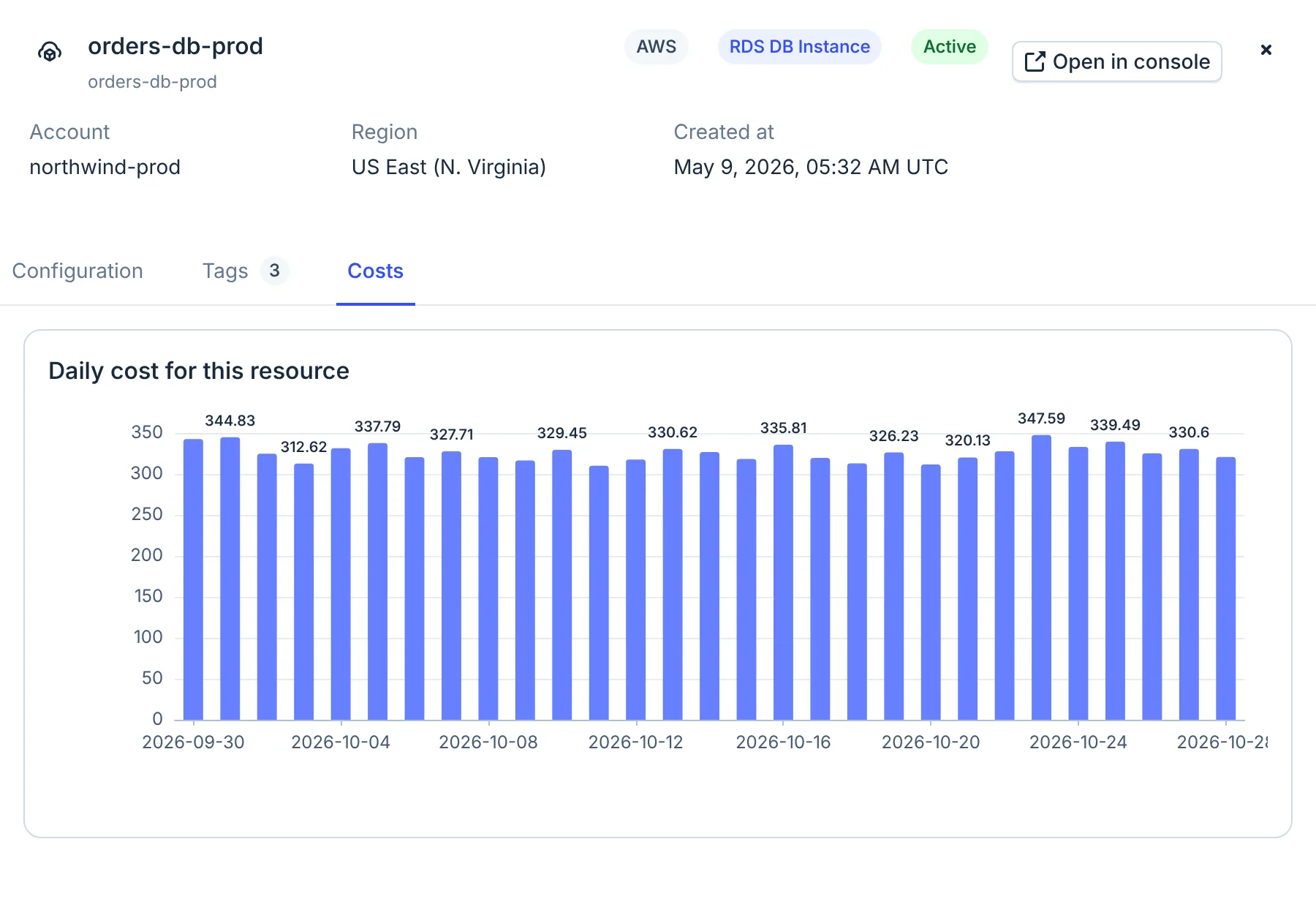
- Costs tab
Read the chart
- One bar for each day the resource was billed, with the day's cost above it. Days with no billing record are left out, so the bars can skip days.
- The figures carry no currency symbol. See the table below for each provider's currency.
- The chart has no total. Hover over a bar for its day and value.
- The dates come from the page's Period, 30 days by default. The panel has no date picker: close it, change Period, then open the resource again.
Cost data goes back about seven months, six for Google Cloud.
How CloudYali matches cost to a resource
| Provider | How the bill is matched to the resource | Currency | Left out |
|---|---|---|---|
| AWS | The resource ID on each billing line | USD | Credits, refunds and tax. Discounts and Savings Plans adjustments on the line are counted |
| Google Cloud | The resource's full name on each billing line. For GKE, Dataproc and Dataflow, the resource's labels, which gives an estimate | Your billing currency | — |
| Azure | The resource ID on each billing line | USD | — |
| Databricks | The name on each billing line | USD | Clusters and jobs often do not match, because billing names them while the inventory holds their IDs. SQL warehouses match |
| Anthropic | Not matched. Anthropic bills by workspace, not by resource | — | — |
Cost Explorer can include AWS credits, refunds and tax; the Costs tab never does. Use the tab to see how a resource's cost moves, and Cost Explorer for totals you report.
When a resource shows no cost
The tab shows No cost data for this resource, with one of these messages:
| Message | What it means | What to do |
|---|---|---|
| Billing data has not been matched to this resource for the selected period. | No billing line names this resource in the period. | Widen Period, or find the cost in Cost Explorer by service. |
| This resource has billing records but no charges in the selected period. | The resource was billed at zero. | Nothing; it cost nothing in the period. |
| No cost data available for this resource in the selected time period. | No billing line names this resource in the period. | Widen Period. |
| Type resources do not generate direct costs. They are configuration or metadata resources. | AWS does not charge for this resource type, such as a VPC or an IAM role. | Nothing. |
| No cost data found. Costs for this resource type are tracked on underlying Compute Engine resources. | A GKE cluster, Dataproc cluster or Dataflow job is billed through its Compute Engine VMs. | Open the VMs, or group Cost Explorer by service. |
| Resource-level cost data is not available for service. | Google Cloud bills this service by project, not by resource. | Use Cost Explorer grouped by service. The rest of the message names an older page. |
| Anthropic costs are tracked at the workspace level. | Anthropic does not bill by resource. | Use Cost Explorer, filtered to Anthropic. The rest of the message names an older page. |
| Error fetching cost data for this resource. | CloudYali could not look up the resource or its costs. | Try again later. |
Limits
- No currency symbol. Read the currency from the table above: Google Cloud figures are in your billing currency, the others in US dollars.
- AWS credits, refunds and tax are left out. Add them in Cost Explorer with Include.
- Databricks clusters and jobs rarely show cost. Use Cost Explorer filtered to Databricks.
- No Anthropic or Fastly cost per resource. Use Cost Explorer.
- One ID, one cost. The tab looks a resource up by its ID alone. When the same ID exists in two regions or accounts, the chart can show the other copy's cost. Check the account and region in Cost Explorer.
- No total and no export. Hover over bars for values, or use Cost Explorer's breakdown.
FAQ
Why does the chart skip some days?
Only days with a billing record for the resource are drawn. A day with no record has no bar, rather than a bar at zero.
Why does the resource cost differ from Cost Explorer?
The Costs tab leaves out AWS credits, refunds and tax, which Cost Explorer can include. It also matches billing lines to one resource ID, so lines billed without a resource ID are not counted.
Can I see a deleted resource's cost?
Yes. Choose a period from before it was deleted, open the resource, and select Costs.
Why does a GKE cluster show no cost?
Google bills a GKE cluster through its Compute Engine VMs. Open the VMs, or group Cost Explorer by service.