Cost types
A cost type is the kind of line on a cloud bill: usage, a fee, a tax, or a reduction such as a credit, a discount or a refund. CloudYali always counts usage and fees, and lets you choose some of the rest with Include.
Net total = usage + fees + tax − discounts − credits − refunds, for the types that are counted.
How CloudYali counts cost
CloudYali shows cost on a cash basis: each charge counts on the day the provider bills it. For AWS this is unblended cost. There is no amortized option in Cost Explorer, the Dashboard, Budgets or the email report, so a commitment's upfront or monthly fee appears on the day it is billed. Amortized commitment cost appears only in Commitments.
| Provider | Cost CloudYali reads | Currency | Day |
|---|---|---|---|
| AWS | Unblended cost from the Cost & Usage Report | As AWS bills you, not converted. Shown with $ | The usage start date |
| Google Cloud | Cost at your prices, net of all credits | Converted to US dollars, line by line, at the rate in the billing export | The usage date in US Pacific time |
| Azure | Cost in US dollars from the Cost Management export | US dollars, as Azure converts them | The export's date |
| Anthropic | The cost report | US dollars | The day Anthropic reports |
| OpenAI | The costs report | US dollars | The day OpenAI reports |
| Cursor | On-demand usage per request, plus seats at $40 per seat per month by default, spread across the month | US dollars | The usage date |
| Databricks | Usage times Databricks' list price. Negotiated discounts are not applied | US dollars | The usage date |
| Fastly | Monthly invoices. The current month's invoice is updated each day | US dollars | The 1st of the month, for every line |
The Include menu
Include in Cost Explorer opens Included costs: Credits, Discounts, Refunds and Taxes. Discounts and Taxes are ticked by default.
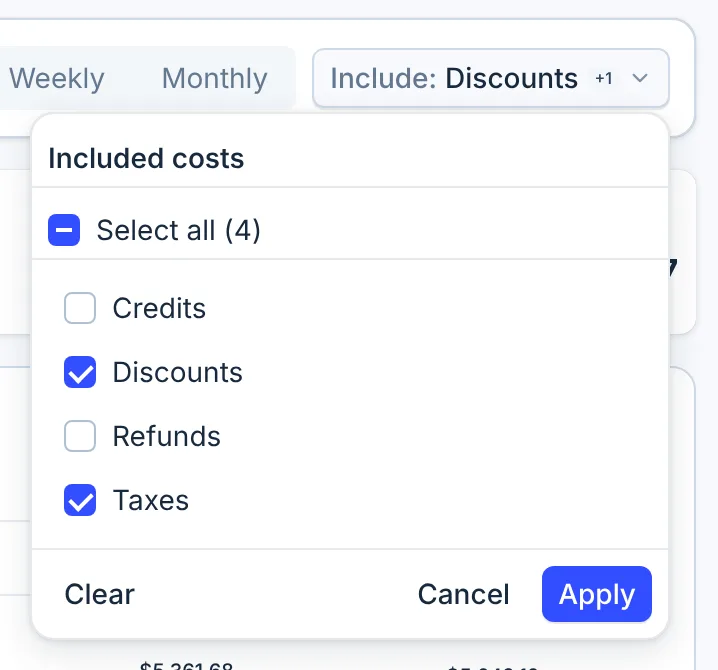
Some reductions always count, whatever the boxes say, because they offset a charge that is always counted:
| Box | AWS | Google Cloud | Azure | Other providers |
|---|---|---|---|---|
| Credits | Adds credits | No effect: credits always count | No effect | No effect |
| Discounts | No effect: discounts always count, including Savings Plan negation and bundled discounts | No effect | No effect | No effect |
| Refunds | Adds refunds | No effect | No effect: refunds always count | No effect |
| Taxes | Adds tax | Adds tax | Adds tax | No effect |
The summary tiles above the chart, Usage, Discounts, Credits, Refunds, Tax and Fees, show each kind separately. A kind you leave out reads $0.00, except the reductions that always count.
With no box ticked, CloudYali uses its own default instead, which counts AWS credits and AWS and Microsoft Azure tax. To see usage and fees with as little else as possible, leave Discounts ticked and untick the rest.
The Dashboard always counts costs as Cost Explorer does by default.
In Cost Views
Cost Views offer the same four boxes, but every box takes effect there. With the defaults, a view leaves out Google Cloud credits and Azure refunds, so its Google Cloud and Azure figures can read higher than Cost Explorer's. Ticking nothing in a view means none of the four.
Lines CloudYali does not count
Cost Explorer counts only the line types it knows. Others are left out, without a notice:
| Provider | Counted |
|---|---|
| AWS | Usage, DiscountedUsage, SavingsPlanCoveredUsage, Fee, RIFee, SavingsPlanRecurringFee, SavingsPlanUpfrontFee, FlatRateSubscription, Discount, BundledDiscount, SavingsPlanNegation, and Credit, Refund and Tax when ticked |
| Google Cloud | Regular charges, adjustments, rounding errors and credits, and tax when ticked |
| Azure | Usage, Purchase and Refund, and Tax when ticked |
| Databricks | Compute time, storage, API operations, networking, GPU time and tokens |
For example, AWS line types such as EdpDiscount (Enterprise Discount Program) and
PrivateRateDiscount are not on the list. If your bill has them, CloudYali reads higher than AWS by
those amounts. To see which types you have, set Group by to Cost type.
History
Cost Explorer holds about seven months of AWS, Google Cloud, Azure, Databricks and Fastly cost, from the 1st of the month seven months back. Anthropic, OpenAI and Cursor keep their full history. A range older than that, such as Last year, shows $0.00 for the first five.