Security and Permissions
Summary
| Control | Behavior |
|---|---|
| Access level | Read-only. No write operations are exposed. |
| Identity | The signed-in CloudYali user. |
| Permissions | Identical to the user's CloudYali role. No elevated or shared credentials. |
| Authentication | OAuth through the CloudYali console. MFA and SSO apply. |
| Authorization | Explicit per-connection approval on the CloudYali approval screen. |
| Credential issued | One access token, valid for up to 45 minutes. |
| Credentials not issued | Password, ID token, refresh token. |
| Renewal | None. A new approval is required after expiry. |
| Staff impersonation | MCP connections cannot be approved during impersonation. |
| Local footprint | None. No software or credentials are stored on the user's machine by CloudYali. |
Read-only access
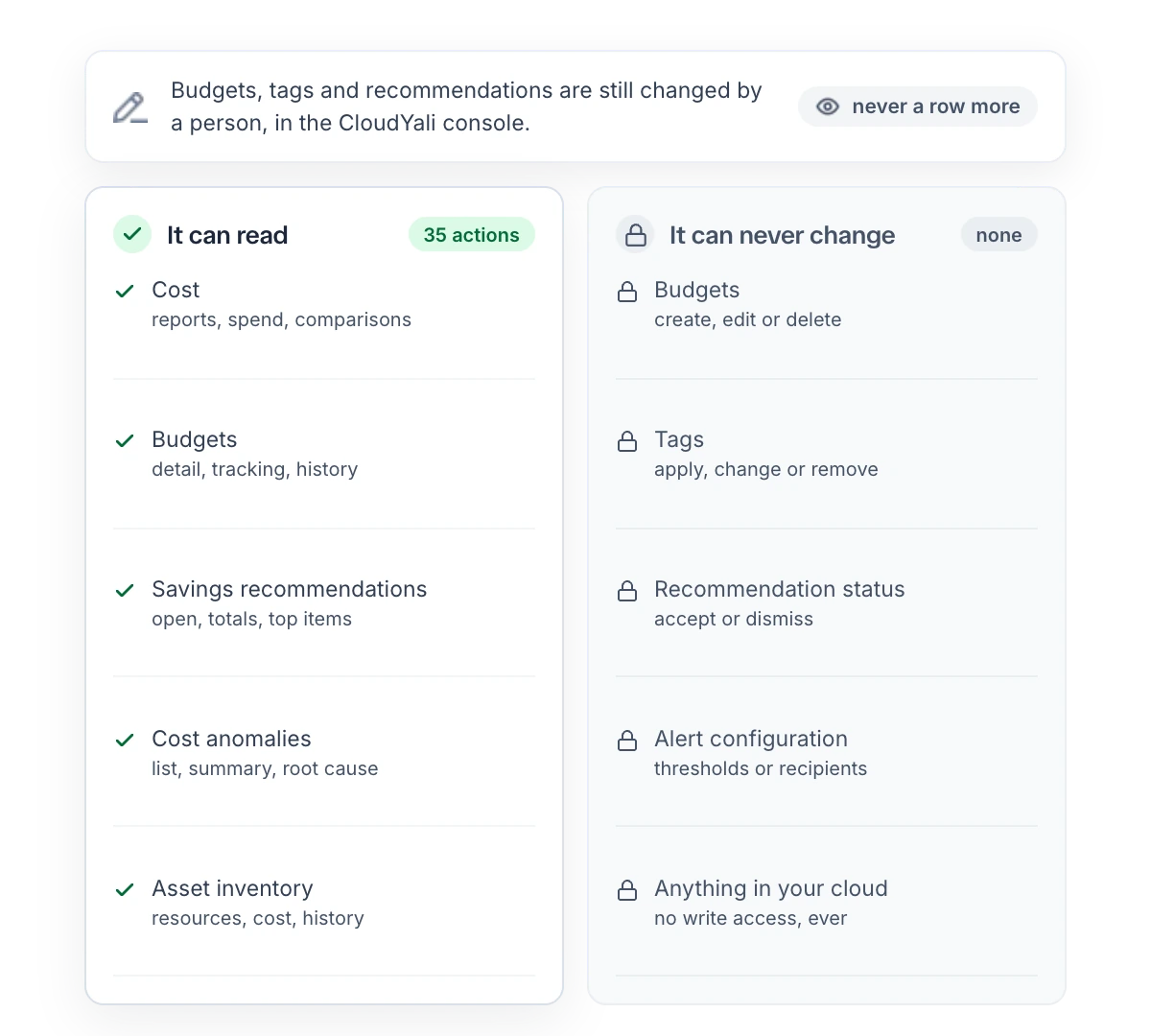
The CloudYali MCP server exposes only read operations. The following are not available through the integration:
- Creating, editing or deleting budgets.
- Changing recommendation status.
- Dismissing anomalies or changing anomaly preferences.
- Editing tags.
- Changing account, user or customer settings.
- Any call to AWS, Azure or Google Cloud APIs.
Perform these actions in the CloudYali console at console.cloudyali.io.
Permission scope
The connection acts as the signed-in user. The assistant can read only the cloud accounts and data that user can read in the CloudYali console. The integration does not use service accounts, shared API keys or elevated scopes.
Sign-in and approval flow
- The MCP client redirects the user to CloudYali.
- The user signs in to the CloudYali console. MFA and SSO apply.
- The console loads the connection request from the CloudYali MCP server and displays the approval screen.
- The user selects Agree & Allow Access or Cancel.
- On approval, the console refreshes the user's session and sends one fresh access token to the CloudYali MCP server. The browser returns to the MCP client.
- On cancel, no token is issued.
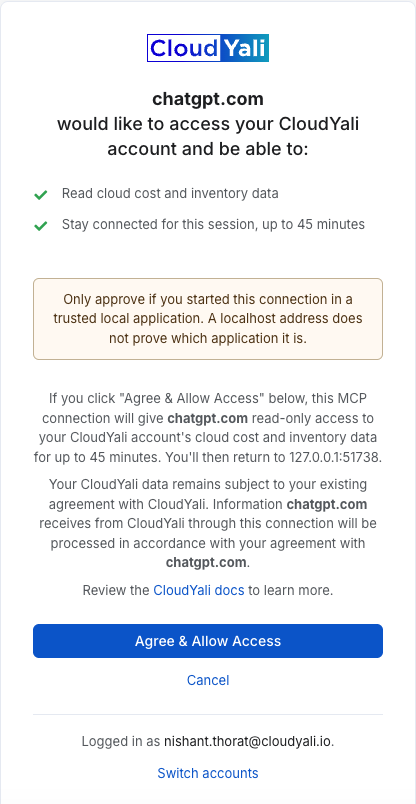
Approval screen contents
| Element | Purpose |
|---|---|
| Client name | Identifies the requesting application (for example, chatgpt.com). Loaded from the CloudYali MCP server, not from the page URL, so a crafted link cannot display a different client name. |
| Permissions | Read cloud cost and inventory data; Stay connected for this session, up to 45 minutes. |
| Return address | The address the browser returns to after approval. |
| Localhost warning | Shown when the return address is a loopback address such as 127.0.0.1. A loopback address does not identify which local application requested access. |
| Signed-in user | The CloudYali user whose permissions the connection receives. Switch accounts changes the user before approval. |
| Data handling notice | States that data received by the client is processed under the user's agreement with that client's vendor. |
Request expiry
Each approval request is time-limited. An expired or completed request shows "This request has expired. Start again from your MCP client."
Token lifetime
The access token issued on approval is valid for up to 45 minutes. The console forces a session refresh before issuing it, so each connection receives the full lifetime. The token is not renewed automatically. After expiry, the MCP client must start a new sign-in and the user must approve again.
To revoke access before expiry, remove the CloudYali connector from the MCP client. The token expires within 45 minutes.
Token transport
- The access token is sent from the console to the CloudYali MCP server in an HTTPS form POST body.
- The destination (
https://mcp.cloudyali.io) is fixed at console build time and enforced by the console's Content Security Policy (form-action,connect-src). - The token is not placed in a URL.
Data flow
| Flow | Description |
|---|---|
| CloudYali MCP server → CloudYali API | HTTPS requests using the user's access token. Same API and data as the CloudYali console. |
| CloudYali MCP server → AI assistant | Query results are returned to the connected MCP client. |
Data returned to the AI assistant is processed under the assistant vendor's terms (for example, OpenAI for ChatGPT or Anthropic for Claude). Review the vendor's data retention and model training terms for your plan before connecting. CloudYali data remains subject to your agreement with CloudYali.
Compliance notes
- Access is bound to an individual user identity; no shared credentials are used.
- Every connection requires an explicit user approval.
- Access is time-limited to 45 minutes per approval.
- Write access to cost controls is not available.
Reporting a security issue
Email support@cloudyali.io. Do not report security issues publicly.