GCP Resource Inventory
CloudYali's GCP Resource Inventory provides comprehensive visibility into all your Google Cloud Platform resources across multiple projects and organizations. Using the Cloud Asset Inventory API, CloudYali discovers, catalogs, and tracks your GCP resources in real-time.
Key Features
Centralized Resource Discovery
- Multi-project visibility: View resources across all your GCP projects in one place
- Organization-wide scanning: Discover resources at the organization, folder, or project level
- Comprehensive coverage: Track 100+ GCP resource types including Compute Engine, Cloud Storage, BigQuery, Cloud SQL, and more
Real-time Resource Tracking
- Automatic synchronization: Resources are synced regularly to keep your inventory current
- Change detection: Identify when resources are created, modified, or deleted
- Configuration tracking: Monitor resource configurations and settings over time
Resource Metadata
Each discovered resource includes detailed metadata:
- Resource name and type: Full resource path and asset type
- Project and organization: Parent project ID and organization hierarchy
- Location: Region or zone where the resource is deployed
- Labels: All GCP labels applied to the resource
- Resource properties: Full configuration data in JSON format
- Timestamps: First discovered time and last sync time
Asset Lifetime and States
CloudYali tracks the complete lifecycle of your GCP resources:
First Discovery
When a resource is discovered for the first time, CloudYali records the 'First Scan Time'. This helps you understand when resources entered your environment.
Live State
All active cloud resources are shown in the 'Live' state. The recorded information for a live resource remains available as long as the resource continues to exist in your GCP environment.
Deleted State
When a resource is deleted from GCP, CloudYali marks it as 'Deleted' with the sync time as the deletion time. Note that the recorded deletion time represents when CloudYali detected the deletion, which may differ from the actual deletion time depending on sync frequency.
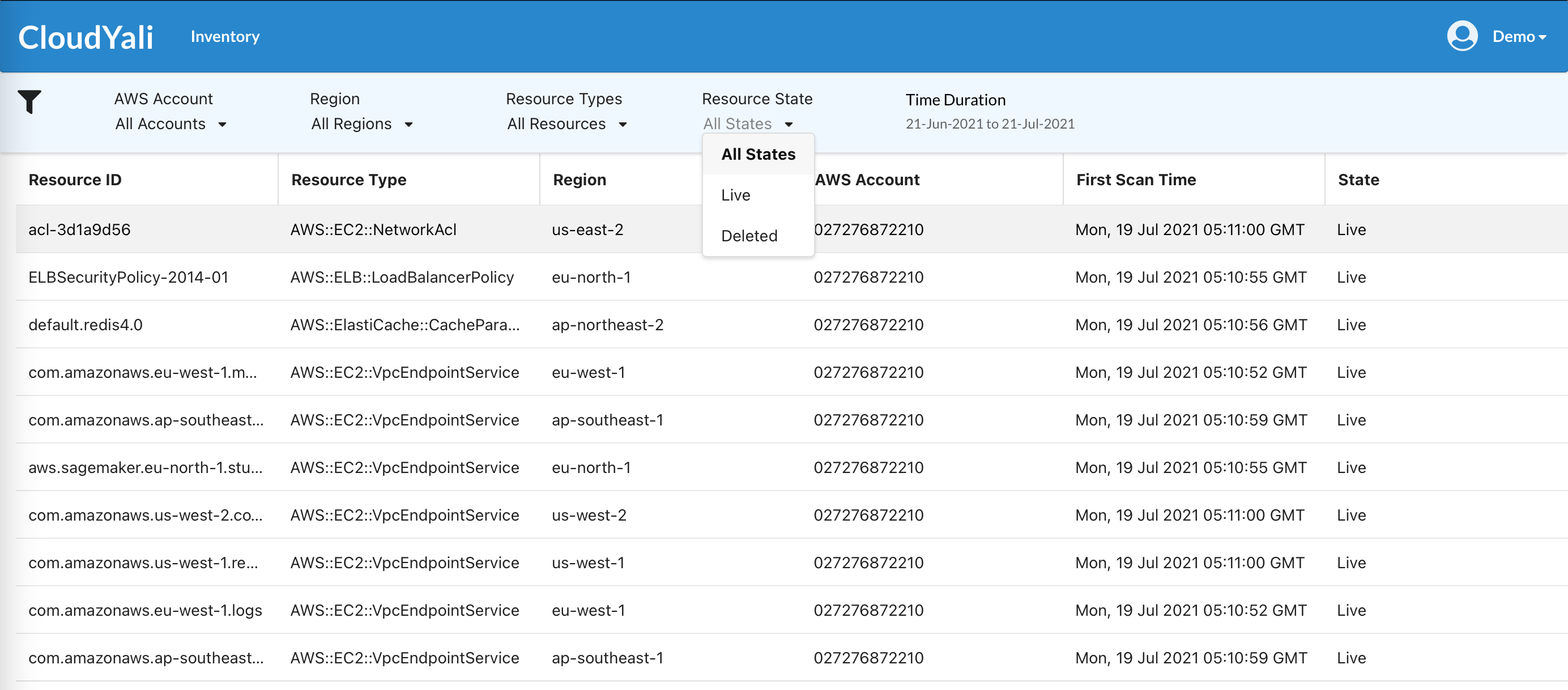
For deleted resources, information is retained for the duration of your retention period. After this period, the data is permanently removed. The retention period depends on your subscription tier.
Supported Resource Types
CloudYali supports discovery of all GCP resource types available through the Cloud Asset Inventory API. Common resource types include:
| Category | Resource Types |
|---|---|
| Compute | VM Instances, Instance Templates, Instance Groups, Disks, Snapshots, Images |
| Networking | VPC Networks, Subnets, Firewall Rules, Cloud NAT, Load Balancers, VPN |
| Storage | Cloud Storage Buckets, Filestore Instances |
| Databases | Cloud SQL Instances, Cloud Spanner, Bigtable, Firestore |
| Big Data | BigQuery Datasets and Tables, Dataflow Jobs, Pub/Sub Topics |
| Containers | GKE Clusters, Cloud Run Services |
| Security | Service Accounts, IAM Policies, Secret Manager Secrets |
| Monitoring | Cloud Monitoring Dashboards, Alert Policies |
Required Permissions
To enable GCP Resource Inventory, the service account used by CloudYali requires the following permissions:
| Permission | Description |
|---|---|
cloudasset.assets.listResource | List all resources in the scope |
cloudasset.assets.searchAllResources | Search for resources across the organization |
These permissions are included in the predefined roles/cloudasset.viewer role.
For detailed permission setup, see GCP Permissions.
Getting Started
- Complete GCP onboarding: Follow the GCP Onboarding Guide - this now includes Resource Inventory setup automatically
- View your resources: Navigate to Inventory > GCP Resources in CloudYali to explore your GCP resources
The GCP Onboarding Guide includes the Cloud Asset API, Cloud Asset Viewer role, and Browser role, so Resource Inventory is enabled automatically when you complete onboarding.
If you completed onboarding before this update, follow the GCP Onboarding Guide to add the missing Browser role and enable the Cloud Asset API.
Related Documentation
- GCP Onboarding Guide - Complete setup including Resource Inventory
- GCP Permissions - Complete permissions reference
- AWS Resource Inventory - Similar functionality for AWS