Anthropic Cost Tracking & Optimization
CloudYali provides comprehensive cost tracking and optimization insights for your Anthropic API usage. Monitor spending across models, workspaces, and token types to optimize your AI infrastructure costs.
Haven't connected your Anthropic account yet? Follow our Anthropic Onboarding Guide to get started.
Key Metrics Tracked
Token Usage Breakdown
CloudYali tracks all token types for accurate cost attribution:
| Token Type | Description |
|---|---|
| Input Tokens | Tokens sent to Claude in your prompts |
| Output Tokens | Tokens generated by Claude in responses |
| Cache Creation Tokens | Tokens written to prompt cache (higher cost) |
| Cache Read Tokens | Tokens read from prompt cache (95% cheaper than input) |
Cost by Model
Track spending across all Claude models:
- Claude Sonnet 4 - Latest balanced model
- Claude 3.5 Sonnet - Balanced performance and cost
- Claude 3 Opus - Highest capability, premium pricing
- Claude 3 Sonnet - Strong performance at moderate cost
- Claude 3 Haiku - Fast and cost-effective for simpler tasks
Model versions are tracked as tags (e.g., anthropic:model) for granular reporting.
Workspace Attribution
For organizations with multiple workspaces:
- View costs broken down by workspace
- Identify high-spending teams or projects
- Enable accurate chargebacks and cost allocation
Cache Efficiency Metrics
Monitor prompt caching performance:
- Cache Hit Rate - Percentage of requests using cached prompts
- Cache Savings - Dollar amount saved through caching
- Cache vs. Regular Cost - Comparison of cached vs. non-cached token costs
Accessing Your Anthropic Cost Data
From the Dashboard
- Navigate to Cost Reports in the menu bar
- Select Anthropic from the cloud provider filter
- View daily, weekly, or monthly cost trends
From Cost Reports
- Go to Reports → Cost Reports
- Filter by Provider: Anthropic
- Drill down using available dimensions (see table below)
Visualizing Your Costs
CloudYali provides multiple chart views to analyze your Anthropic spending:
Cost by Model (Bar Chart)
Track daily spending across Claude models with stacked bar charts:
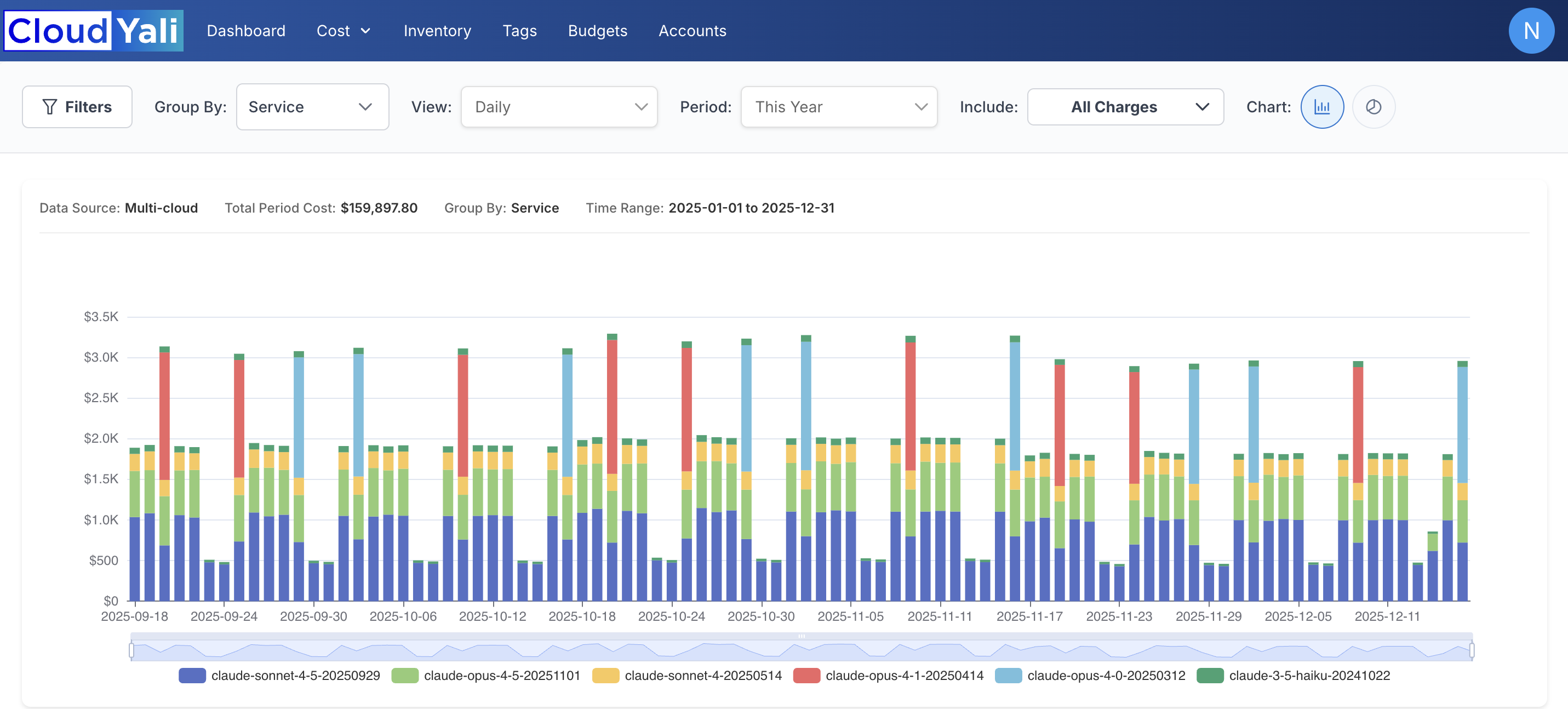
Daily cost breakdown by Claude model showing spending trends over time
Cost by Model and Usage Type (Bar Chart)
For granular analysis, group by both model and usage type (messages vs. batch):
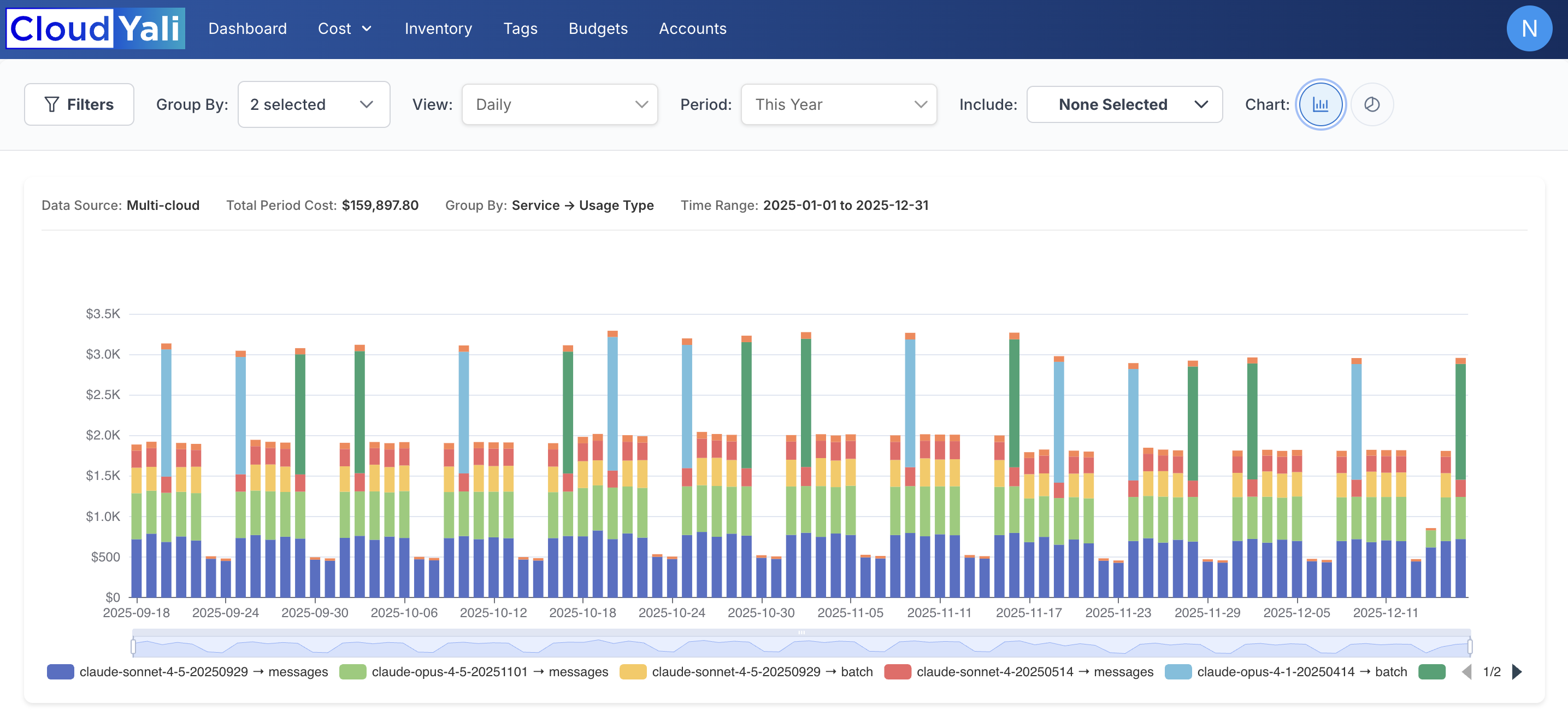
Daily cost breakdown showing both model and usage type (messages API vs. batch API)
Cost Distribution (Pie Chart)
View percentage breakdown of spending by model:

Percentage distribution of costs across Claude models
Available Report Dimensions
Filter and group your Anthropic cost data by these dimensions:
| Dimension | Description | Example Values |
|---|---|---|
| Organization | Billing account level | Your Anthropic org name |
| Workspace | Team or project level | "Production", "Development" |
| Service | Claude model used | Claude Sonnet 4, Claude 3.5 Sonnet, Claude 3 Haiku |
| Category | Token type | tokens, web_search |
| Subcategory | Specific operations | cache_read, cache_write, input, output |
| Resource | API key identifier | API key ID used for requests |
| Tags | Model version tags | anthropic:model |
Use the Workspace dimension to allocate costs to specific teams or projects for accurate chargebacks.
Exporting Data
- Click Export CSV to download cost data for finance teams
- Schedule automated reports for regular cost reviews
Understanding Cache Savings
Prompt caching can significantly reduce your Anthropic costs:
| Scenario | Cost Comparison |
|---|---|
| Regular input tokens | Full price |
| Cache creation tokens | 25% more than regular input |
| Cache read tokens | 90% cheaper than regular input |
Maximizing Cache Efficiency
- Identify repeated prompts - System prompts and common instructions are ideal for caching
- Monitor cache hit rates - Low hit rates indicate optimization opportunities
- Review cache creation costs - Ensure cache creation costs are offset by read savings
Best Practices for Cost Optimization
1. Choose the Right Model
| Use Case | Recommended Model |
|---|---|
| Complex reasoning, analysis | Claude 3 Opus |
| General-purpose tasks | Claude 3.5 Sonnet |
| High-volume, simple tasks | Claude 3 Haiku |
2. Optimize Token Usage
- Keep prompts concise while maintaining clarity
- Use system prompts efficiently
- Batch similar requests when possible
3. Leverage Prompt Caching
- Cache frequently used system prompts
- Monitor cache efficiency metrics regularly
- Adjust caching strategy based on usage patterns
4. Monitor Workspace Costs
- Set up alerts for spending thresholds
- Review workspace costs weekly
- Identify and investigate cost anomalies
5. Regular Cost Reviews
- Export monthly reports for finance review
- Compare costs across time periods
- Track cost per request or per user
Setting Up Cost Alerts
CloudYali can notify you when Anthropic spending exceeds thresholds:
- Navigate to Budgets & Alerts
- Click Create Alert
- Select Anthropic as the provider
- Set your spending threshold
- Configure notification preferences
Multi-Cloud Cost View
View Anthropic costs alongside your other cloud spending:
- Combined AWS, GCP, and Anthropic cost dashboard
- Unified cost trends and comparisons
- Single source of truth for all cloud costs
Supported Scope
CloudYali tracks costs for Claude API usage directly through Anthropic. This integration covers:
- Direct API calls to Anthropic's Claude models
- All Claude model variants (Opus, Sonnet, Haiku)
- Both Messages API and Batch API usage
This integration supports Claude usage directly through Anthropic only. Cloud-hosted Claude options are tracked separately:
- Amazon Bedrock — Claude costs appear in your AWS cost reports
- Google Cloud Vertex AI — Claude costs appear in your GCP cost reports
For additional help or to schedule a cost optimization consultation, contact our support team at support@cloudyali.io.